
You finish a video. Then comes the second shift: a caption, a newsletter, a LinkedIn post, a carousel and three different ways of saying “here is the video.”
Repurposing should make that easier. But if the result is ten nearly identical posts, you have multiplied the noise rather than the value.
The better approach is to reuse the thinking while changing the job each piece does for the reader.
Start with a source worth reusing
For this worked example, imagine you recorded a video about finding unwanted subscriptions. It includes a simple method: check statements, list recurring charges, decide what you still use and verify whether cancelling changes access.
That is enough for several formats. You do not need to invent a dramatic “I saved $4,000 overnight” story to make it interesting.
Use a transcript or your own notes. If a transcript came from automatic captions, correct names, numbers and obvious mistakes before asking a model to work from it. Only use material you own or are authorised to repurpose.
Give each output a different job
| Output | Its job | What it uses from the source |
|---|---|---|
| Short-video script 1 | Make the recurring-charge problem recognisable. | The opening situation. |
| Short-video script 2 | Teach one small action. | The statement-checking step. |
| Short-video script 3 | Prevent a mistake. | The cancellation caveat. |
| LinkedIn post | Explain a useful decision. | Keep, cancel or investigate. |
| Instagram caption | Invite a simple next step. | One charge to check today. |
| Carousel outline | Teach the full process visually. | The sequence of steps. |
| Newsletter | Help readers use the method. | An example and a checklist. |
| Blog outline | Organise a fuller explanation. | The process, limitations and questions. |
| FAQ block | Resolve common uncertainty. | What the original actually answers. |
| Resource description | Explain a relevant tool honestly. | How a list or tracker supports the task. |
Ten is a menu, not a publishing quota. If the video supports four useful pieces, make four.
Separate extraction from writing
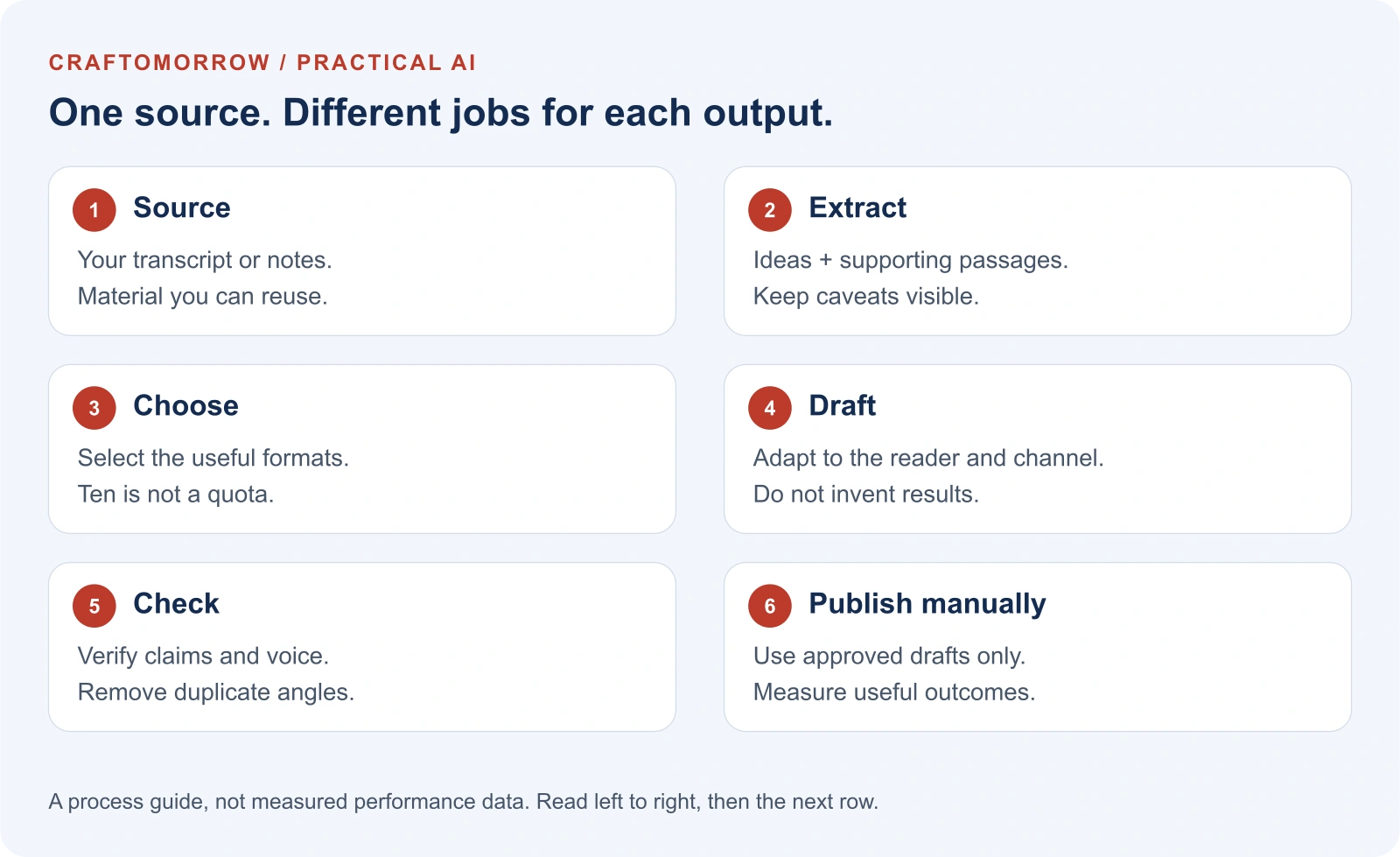
First ask for the main ideas, supporting passages, examples and caveats. This creates a small source map you can check before you read ten polished drafts.
Then choose the formats you need and give each one a clear purpose. “Write a LinkedIn post” is less helpful than “explain why listing subscriptions is different from cancelling them; use one practical example; do not invent personal results.”
Finally, review the drafts against the source map. It is easier to catch drift when the evidence remains visible beside the copy.
That is a workflow, not simply a longer prompt: source, extraction, selection, drafting and review each have a different job.
A better opening than ‘In today’s fast-paced world’
For the subscription example, a short post could begin:
That is a situation readers can recognise. It does not claim that every reader has exactly three forgotten charges, or that checking subscriptions will solve their entire financial situation.
The next sentences should earn the opening: explain the action, show how to do it and include the limitation. Curiosity without an answer is just a delayed disappointment.
What automation can prepare
An AI-assisted workflow can turn a supplied transcript into a structured set of draft angles. It can create channel-specific first drafts, propose titles and list claims that deserve checking.
It can also keep the outputs together, apply length limits and flag missing fields. Those practical details reduce the copy-and-paste work around the model.
Do not quietly turn “draft short-video script” into “produce a finished video.” Selecting footage, cutting clips, adding captions, checking music rights and exporting video are different tasks. A text repurposing workflow does not do them unless it includes and tests those capabilities.
Use a five-minute review before scheduling anything
Read the first sentence of each draft. Do they all sound the same? Change the angle or remove the weaker versions.
Check every number and every sentence beginning with “I,” “we” or “our customers.” The model must not supply experiences or testimonials you did not give it.
Check the action you are inviting. A useful free tutorial does not need to end in an unrelated product pitch. If a tracker genuinely helps the reader follow the method, explain the connection and keep the choice optional.
Finally, read one draft aloud. If it sounds like a company announcing a strategic initiative rather than a person explaining something useful, simplify it.
Measure the right result
Track preparation time, editing time and which outputs you actually publish. More drafts are not necessarily more useful drafts.
Compare content formats on their own terms. A newsletter click and a short-video view do not represent the same action. Look for whether the piece helped a person take the intended next step.
Start with one source and two channels. Expand only when your review process is working.
Build a source pack before you build a content factory
The most useful input is not a link followed by “make this viral.” It is a small packet that tells the workflow what it can actually use. A link may point to a page the tool cannot access, a video without captions, or a transcript missing the visual demonstration. Until you check what arrived, you do not know what the model is working from.
Create one folder or document for the source. Put the original title, its address, the date you checked it, the transcript, relevant screenshots you are entitled to use, and your notes together. Mark the difference between something the speaker said and something you added afterwards. That distinction becomes surprisingly important when a draft starts describing an example as a result.
For our fictional subscription tutorial, the source pack is deliberately modest. It contains a statement-review method, not a promise to reduce anyone’s bills. There is no customer testimonial, no verified saving, and no demonstration of automatic cancellation. The content can still be useful. Its job is to help a reader discover what needs checking, rather than to manufacture an extraordinary outcome.
- 00:20 — The situation
- A person notices recurring payments they no longer recognise.
- 01:10 — The method
- List the merchant, charge, billing interval and whether the service is still used.
- 03:00 — The decision
- Sort items into keep, investigate and consider cancelling.
- 04:10 — The boundary
- Check account access, renewal terms and important stored files before changing a subscription.
Illustrative source map, not a transcript of a real customer or a measured savings case study.
Those four entries are enough to direct a writer. They also make a reviewer’s job easier: if a draft promises a fifth thing, you can ask where it came from. You are not trying to remember the entire video while assessing twenty sentences of polished copy.
If you use your own YouTube video, inspect the captions in the creator tools and correct them before reusing the text. YouTube’s caption guidance explains the available caption-editing routes. A transcript is a convenience, not a guarantee that names, amounts or the word “not” survived correctly.
Find different angles, not ten different synonyms
A good angle changes the question the reader gets answered. “Find subscriptions,” “discover subscriptions” and “uncover subscriptions” are the same angle wearing different shirts. The source can instead answer what to do first, what to record, how to decide, and what not to do. Each answer has a different reason to exist.
Write a one-sentence reader question for every planned output. For a short video, it might be “What can I check in two minutes?” For a newsletter, “How do I finish the whole review?” For a carousel, “What fields should be on my list?” If two pieces answer the same question in the same way, keep the stronger one or move the second to a later reminder.
Do not assume that every viewer is ready to buy. Someone seeing your brand for the first time may need a useful action and a clear explanation. Someone who already uses your free tracker may want a more capable tool. The content should meet that difference instead of attaching the same sales paragraph to every format.
| Reader question | Strong angle | Weak substitute |
|---|---|---|
| Where do I begin? | Start with one statement and one unfamiliar charge. | Ten tips to transform your finances. |
| How do I avoid guessing? | Match the merchant to an account before categorising it. | AI reveals the truth about your spending. |
| Should I cancel everything? | Separate unused services from essential access. | Stop paying for subscriptions today. |
| What makes the tool helpful? | It keeps amounts, intervals and decisions together. | The ultimate game-changing dashboard. |
The strong versions have a limit. That is an advantage: the reader knows what the piece will deliver. The weak versions have atmosphere but little instruction. You can create curiosity with a precise contrast, an overlooked step, or a familiar frustration without inflating the claim.
What ten useful outputs can actually look like
The examples below all come from the same fictional source. They are draft material to adapt, not a claim that these exact words have produced sales. Notice how the action and depth change. Some pieces introduce the problem; others teach the method or help someone use a resource.
1. A short-video script about the first small action
“Don’t start your subscription review by cancelling everything. Start by finding one charge you can’t explain. Open a recent statement. Write down the merchant and amount. Then check which account it belongs to. That tiny list is more useful than guessing from memory. Once you know what you’re paying for, you can decide what deserves a closer look.”
Pair the opening with a redacted mock statement, not someone’s real banking screen. Show the row becoming a simple list entry. The visual explains the action while the voice explains the reason. A brief caption can say “Check first. Decide second.” Do not add a timer suggesting that a complete financial review takes thirty seconds.
2. A short-video script about a mistake
“A service you barely use might still hold files you need. Before you cancel, check what happens to access, storage and renewal. Listing a subscription and cancelling it are two different jobs. Put uncertain items in ‘investigate’ instead of forcing a yes-or-no decision. You can make progress without making a rushed change.”
This piece needs a different scene: a mock checklist with “files,” “access” and “renewal” beside an investigate label. It does not need the same statement-opening footage as the first video. You have reused the thinking, but created a second useful lesson rather than a second introduction.
3. A short-video script about the tracker
“If your subscription list has only service names, it’s missing the decision. Add the amount, billing interval and a next step. Keep means you’ve checked it. Investigate means you need more information. Consider cancelling means you’ll review the account terms before acting. A tracker is useful when it helps you finish the review, not just collect another list.”
Show the three decision labels in the actual tool only if those labels exist. Otherwise use a clearly illustrative worksheet. A tutorial should not imply that a downloadable product has functions it does not offer. The call to action can be a free example worksheet rather than a purchase demand.
4. A LinkedIn post built around a decision
“The hardest part of a subscription audit isn’t finding the charges. It’s deciding what each one means. A familiar merchant may be essential. An unfamiliar name may be a service you use every day. I’d separate the work into three steps: list the charge, identify the account, then choose a next step. ‘Investigate’ is a useful answer. It keeps uncertainty visible instead of turning a guess into a decision.”
The first-person sentence is an editorial recommendation, not an invented personal success story. If the account you publish from uses a different voice, replace it. Add a genuine question, such as which part of the review readers find difficult, rather than asking people to comment a keyword merely to inflate engagement.
5. An Instagram caption with one manageable next step
“One charge. One check. You don’t have to solve your entire budget today. Pick a recurring payment you don’t recognise, note the merchant and amount, and find the account behind it. Don’t share your statement in the comments. Keep your private details private, and decide what to do only after you’ve checked the service.”
Use a visual with a readable action, not a dense screenshot containing fifteen fields. The caption adds privacy and scope that may not fit comfortably on the image. If you offer a tool, place the optional link instruction after the useful part so the post still makes sense without clicking.
6. A carousel that teaches the sequence
- Cover: The subscription review starts before the cancel button.
- Slide two: List the merchant, amount and billing interval.
- Slide three: Identify the account. Merchant names can be unclear.
- Slide four: Mark keep, investigate or consider cancelling.
- Slide five: Check access, files and renewal terms before changing anything.
- Last slide: Choose one item to investigate next.
Each slide should carry one main idea. Include enough context that a saved slide is not misleading on its own. A large “cancel” headline without the surrounding caution would contradict the source. Reuse the same visual hierarchy across slides, but vary the example so the carousel does not feel like six title cards.
7. A newsletter that helps someone finish
Subject: Start with the charge you can’t explain
“A useful subscription review starts with a list, not a dramatic clean-out. Open a recent statement and choose one recurring payment you don’t recognise. Record the merchant, amount and billing interval. Then find the account behind it. If you’re unsure, mark it ‘investigate.’ Before cancelling anything, check access, stored files and renewal terms. That is enough for a first session. The aim is a clearer decision, not a perfect spreadsheet.”
A fuller newsletter can add the worksheet and an example row. Keep the main action near the top; do not bury it below a long brand introduction. If you send marketing email, use your normal consent and unsubscribe process. A useful tutorial does not make an unrequested promotional message welcome.
8. A blog outline that earns its extra length
Open with the recognisable problem, explain the fields, work through an illustrative statement, show how to handle uncertain merchants, and finish with a review checklist. Add sections on refunds, billing intervals and account access only after checking the relevant facts. A transcript alone may not answer those questions, so label new research and link its sources.
This is where expansion becomes authorship rather than compression. The blog needs examples, explanation and judgement that justify reading a longer piece. Do not stretch the video’s six points into thirty paragraphs of reassurance. Use the new space to answer questions the original format could not handle well.
9. An FAQ that admits what the source does not know
Can a merchant name identify the service? Sometimes, but an unclear label needs checking against your account or receipt. Does an unused service mean I should cancel it? Not automatically; first check whether you need its access or files. Will this method calculate my savings? Only verified amounts and billing intervals can support a calculation, and cancellation timing can affect the result.
Those answers prevent misunderstanding. If the source does not explain a provider’s cancellation rules, the FAQ should point the reader to that provider instead of inventing them. An honest unanswered question is more useful than confident boilerplate.
10. A resource description that connects naturally
“Subscription Audit helps you organise recurring payments in one place. Record a charge, review its billing interval, and keep track of what needs checking next. Use it alongside your statements and account details; it does not identify every merchant or cancel services for you.”
That is a credible connection between content and product. It explains the assistance and its limits. On Craftomorrow, you can inspect the Subscription Audit resource before deciding whether it fits your process. The article remains useful even if you use paper or an existing spreadsheet instead.
The edit room: keep the hook, remove the invention
Editing an AI draft is not just correcting punctuation. Look for changes in certainty, ownership and scope. “This can help you review” may become “this will save you money.” A sample becomes a testimonial. A suggested method becomes something your company claims to have tested. Those are material changes, even when the copy reads smoothly.
Reject: “I found $500 in hidden charges using this one trick. Download the tool and stop wasting money instantly.”
Keep: “A recurring charge can be easy to overlook. List one unfamiliar payment, identify the account, and decide whether it needs a closer review.”
The revision removes an unsupported personal result, an unverified amount and an instant-outcome promise while preserving a concrete action.
Next check the verbs. “Can prepare” is different from “has completed.” “Review” is different from “approve.” “Suggest” is different from “verify.” Good marketing language can be energetic without collapsing those distinctions. If the product generates draft captions, describe draft captions. Do not sell an autonomous video studio unless you have actually built one.
Finally, check whether the post answers its own opening. A hook about forgotten charges should lead to identifying charges. A hook about cancellation mistakes should explain the checks. If the middle abruptly turns into an unrelated product pitch, the reader experiences the opening as bait rather than a useful promise.
A practical workflow you can build without publishing permissions
Start manually in a document before building automation. Copy in one checked source, create the evidence board, choose two formats, draft them, and review. This gives you a reference output to compare with the automated version. Without that reference, you may spend hours connecting nodes while still not knowing what good output looks like.
For an n8n version, separate the stages instead of putting every instruction into a single AI call. An intake form receives the source text and context. A normalisation step gives it a source identifier and records which formats were requested. An extraction stage prepares claims and supporting passages. A human checks that map before drafting continues.
The drafting stage receives only the selected evidence and the format brief. The validation stage checks required fields, lengths and empty output. The result goes to a review document or table, not directly to social accounts. This design needs fewer permissions and leaves the final decision with a person.
- Intake: source text, ownership notes, audience and formats.
- Evidence gate: are claims and caveats supported?
- Drafting: one reader question per selected format.
- Editorial gate: does the copy stay accurate and useful?
- Handoff: approved copy goes to your ordinary production process.
Suggested architecture, not a claim that a connected automation or video renderer is installed on this website.
Use a record for each output: source ID, format, angle, body, evidence references, review status and version. The record makes it possible to revise one piece without regenerating the whole pack. It also prevents a draft newsletter from being mistaken for an approved caption.
If you process several items, check how the chosen n8n nodes handle lists. The official Loop Over Items documentation explains when batching is needed; many nodes already process lists. Do not add unnecessary loops or an endless retry that keeps paying for the same unsuccessful draft.
Give failures a destination. A missing transcript should become “source needed.” An unsupported claim should become “review needed.” A provider error should become a visible failed run. n8n’s error-workflow guidance describes setting a separate failure handler. Reporting the problem is better than silently returning an empty content pack.
The boundary between a script and a finished video
A script pack can include spoken words, on-screen text, suggested shots and an editing note. That is valuable preparation, but it is not footage. A finished video also needs recordings or licensed assets, timing, captions, audio decisions and an export that works on the intended platform. Those jobs should be visible in the handoff.
For the first subscription script, the production sheet could request a redacted statement mockup, a list-entry animation and a keep/investigate/cancel card. It should specify that no real account details appear. If you add an AI-generated presenter, do not present that character as a real customer giving a genuine testimonial.
Check each exported clip with sound on and off. Can someone follow the action from the captions? Does important text remain clear rather than being covered by platform controls? Does the spoken claim match the visual? A stock clip of luxury travel cannot prove that a budgeting worksheet changed someone’s life.
When a product demo is involved, use the current product. If the screen is illustrative, label it. The fastest way to create mistrust is to advertise a polished interface and then deliver a different tool. A modest, accurate demonstration can be more persuasive than a cinematic promise the download cannot keep.
Calculate the cost of the pack, not just the AI call
Imagine a fictional manual process takes fifteen minutes to find the source, twenty to draft and twenty-five to edit. That is sixty minutes. An automated version might use five minutes of intake, ten minutes of evidence review, and thirty minutes of editing. It would save fifteen minutes in this example, not the full sixty. These are illustrative timings, not measured results.
Add setup and maintenance separately. Building the workflow is not free just because the model call is inexpensive. Transcript cleanup, failed runs, changing instructions and updating integrations take attention. Record those costs for a few real sources before deciding whether more automation is worthwhile.
A useful score is the number of publishable pieces per review session, alongside editing time. Ten rejected drafts are not better than two strong ones. Track which draft needed factual repair, which needed voice editing, and which was unnecessary. Those labels tell you whether to improve the source, the brief or the output selection.
Keep channel results separate. A tutorial might produce fewer views but more meaningful resource visits. A broad introductory clip might attract attention without purchases. Measure the action you intended rather than treating every impression as the same business result. Compare several relevant pieces before drawing conclusions from a single post.
Keep the source attached when the content travels
Store a source identifier on every draft and final asset. If a provider changes its interface or a statement in your tutorial needs correction, you can find the derivative content. Without that link, a single outdated video can leave behind a newsletter, three captions and a product description that all need a manual search.
Keep an approved version separate from a working version. A team member editing the carousel should not accidentally alter the newsletter scheduled for tomorrow. Use simple statuses such as draft, needs evidence, approved and published. You do not need elaborate software; a carefully maintained table can do the job.
When you repurpose someone else’s material, permission and attribution matter. A public link is not blanket permission to reuse footage, images or entire passages. Prefer your own sources and explain when you are discussing a third-party idea. Rewriting a transcript with AI does not automatically settle ownership questions.
Decide what to keep after publication. Store enough evidence to support your claims and make revisions, but avoid retaining unnecessary personal details or private client material. A reusable editorial system should make the next source easier to handle without becoming an uncontrolled archive of sensitive information.
Your first session: one source, two useful pieces
Choose a source that contains a real method, demonstration or lesson. Correct the transcript, make four evidence-board entries, and write two reader questions. One piece can introduce the first action. The other can explain a mistake or a decision. Draft those two before asking for the whole menu of ten.
Review with the source open beside the drafts. Remove invented experiences, verify quantities, preserve caveats and read the copy aloud. Prepare the required visual assets only after the wording is approved. Otherwise you can spend time polishing an inaccurate script that should have been rejected at the evidence gate.
After publishing, record the preparation time, editing time and the reader action each piece was meant to support. Keep the stronger angle, note the weakest instruction and use that lesson on the next source. The goal is not a content machine that never stops. It is a repeatable process that makes useful publishing less exhausting.
Can I automate publishing as well?
It is a separate integration and permission decision. Begin with drafts. Avoid granting publishing access until you have tested accuracy, duplicate handling, account permissions and failure recovery.
Do I need a transcript for this?
A transcript is useful, but your own detailed notes can work. The important part is a trustworthy source with enough substance to support the outputs.
For the underlying building blocks, see n8n’s workflow import and export documentation. Importing a workflow does not connect credentials or make it production-ready by itself.
Was this article useful?
Your feedback helps us improve these guides.